 NorCloud login

/Nor150-sound-inensity-jorge(800x800px).webp?width=800&height=800&name=Nor150-sound-inensity-jorge(800x800px).webp)
.webp?width=1824&height=2736&name=Norsonic_v2-74-(1824x2736px).webp)
/Nor286-Origami/Nor286-origami-light-blue-800x600px.webp?width=450&height=275&name=Nor286-origami-light-blue-800x600px.webp)
How reusable is an Origami Impulse Source for reverberation time measurements?

/Acoustic%20camera%20white%20webp%20(664x664px)/Acoustic-camera-hextile-white-(664x664px).webp?width=664&height=664&name=Acoustic-camera-hextile-white-(664x664px).webp)
/Acoustic%20camera%20white%20webp%20(664x664px)/Multitile-acoustic-camera-white-(664x664px).webp?width=664&height=664&name=Multitile-acoustic-camera-white-(664x664px).webp)
/Acoustic%20camera%20white%20webp%20(664x664px)/Multitile-LF-white-(664x664px).webp?width=664&height=664&name=Multitile-LF-white-(664x664px).webp)
/Acoustic%20camera%20white%20webp%20(664x664px)/Nor848B-side-white-(664x664px).webp?width=664&height=664&name=Nor848B-side-white-(664x664px).webp)
/Acoustic%20camera%20white%20webp%20(664x664px)/Nor848-multitile-white-(664x664px).webp?width=664&height=664&name=Nor848-multitile-white-(664x664px).webp)
/Acoustic%20camera%20white%20webp%20(664x664px)/Norsonic-acoustic-camera-case-white-(664x664px).webp?width=664&height=664&name=Norsonic-acoustic-camera-case-white-(664x664px).webp)
/Acoustic%20camera%20white%20webp%20(664x664px)/Norsonic-acoustic-camera-details-back%20-white-(664x664px).webp?width=664&height=664&name=Norsonic-acoustic-camera-details-back%20-white-(664x664px).webp)
/Acoustic%20camera%20transparent%20webp%20(664x664px)/Nor848-multitile-transparent-(664x664px).webp?width=664&height=664&name=Nor848-multitile-transparent-(664x664px).webp)
Acoustic beamforming arrays—often referred to as acoustic cameras—make it possible to visualise and separate multiple sound sources by frequency and level with a high degree of precision. The ability to distinguish sources that are close together, especially at lower frequencies, is primarily determined by the physical aperture and the number of microphones in the array.
While post-processing methods such as image manipulation and deconvolution can improve the perceived resolution, the fundamental characteristics of the array will always govern the quality of the result. This relationship between array size and achievable resolution is central to acoustic camera design.
Users typically need an array that is compact, lightweight, and easy to deploy in the field—yet also capable of delivering high resolution and meaningful results over a broad frequency range, including low frequencies. Until recently, achieving all of these requirements in a single system has been difficult.
/Acoustic%20camera%20transparent%20webp%20(664x664px)/Nor848-hextile-transparent-(664x664px)-1.webp?width=664&height=664&name=Nor848-hextile-transparent-(664x664px)-1.webp)
With a single Hextile, the user has a small, portable and lightweight acoustic camera that can be used for a wide range of measurement situations.
The Hextile is a USB based acoustic camera, with a single USB cable for both power and data transfer – no extra battery cable needed.
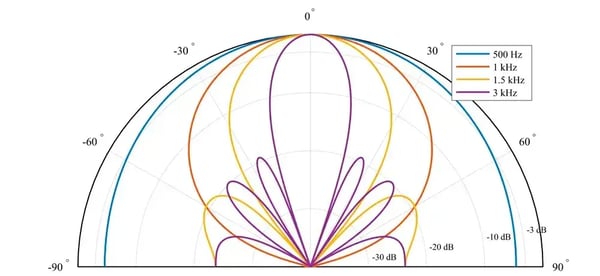
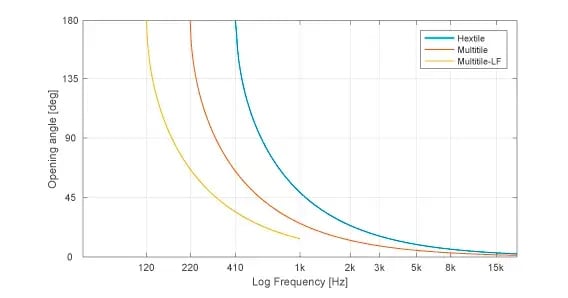
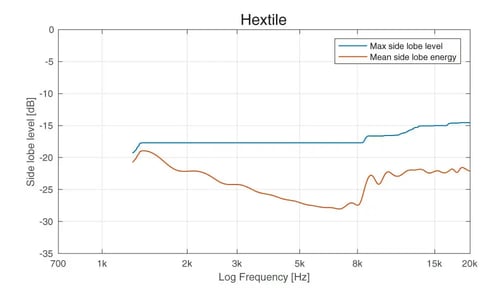
The array is made from robust and lightweight aluminium, has 128 MEMS microphones, and is less than 3 kg in weight while having a maximum diameter of 46 cm. The low frequency limit for the Hextile is 410 Hz.
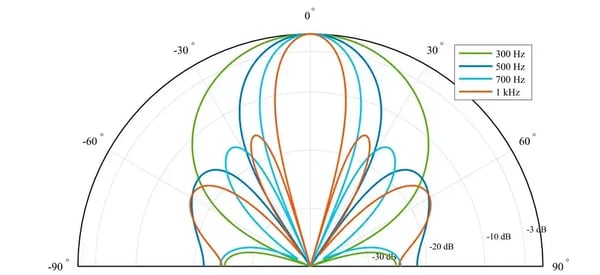
Array geometry and beampattern for Hextile :
/Acoustic%20camera%20transparent%20webp%20(664x664px)/multitile-transparent-(664x664px).webp?width=664&height=664&name=multitile-transparent-(664x664px).webp)
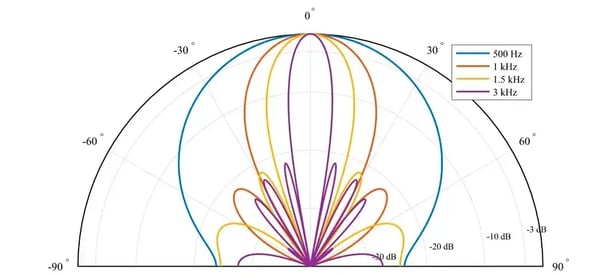
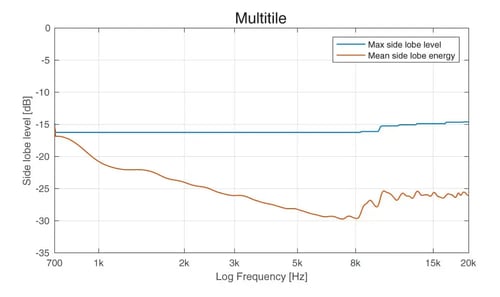
If you need higher resolution, especially at low frequencies, you can combine three single Hextiles into one Multitile system, giving you 384 microphones and a maximum array diameter of 96 cm.
The low frequency limit for the Multitile is 220 Hz.
Array geometry and beampattern for Multitile:
/Acoustic%20camera%20transparent%20webp%20(664x664px)/multitile-lofreq-transparent-(664x664px).webp?width=664&height=664&name=multitile-lofreq-transparent-(664x664px).webp)
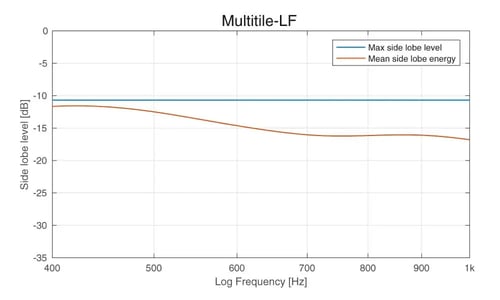
For special low frequency applications below 1 kHz, you can utilise the Multitile in the low frequency configuration as the Multitile (LF mode).
By placing the individual Hextiles further away, the maximum diameter of the complete array system is increased to 1.46 m, making it ideal for low frequency measurements.
The Multitile (LF mode) is for low frequency measurements below 1 kHz, with a lowest frequency limit of 120 Hz.
Array geometry and beampattern for Multitile (LF mode):
Sometimes sources may be closely spaced apart, or a strong noise source in the area of interest is interfering with the recording and impairing the image quality. Often this will be seen as either a single large source, or the source of interest will be completely shadowed by the stronger source. Seen in the image below is a situation where two equally strong sources are positioned close to one another, and the resulting colour plot will display a single large source. In such situations the acoustic eraser feature may prove valuable. This function will add a red circle to the screen that can be dragged to any point, and remove the source from that point. This is highly effective when several noise sources are present. As seen on the pictures the acoustic eraser completely removes the source where the suppress point button is positioned. The virtual microphone can further be positioned on the source of interest.
/Acoustic%20camera%20white%20webp%20(664x664px)/acoustic_eraser_1.webp?width=271&height=210&name=acoustic_eraser_1.webp)
/Acoustic%20camera%20white%20webp%20(664x664px)/acoustic_eraser_2.webp?width=270&height=209&name=acoustic_eraser_2.webp)
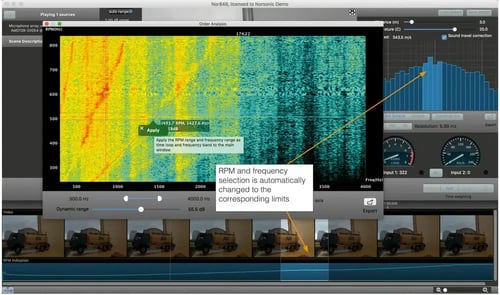
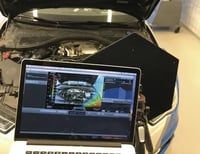 Especially in automotive applications RPM measurements may give vital information. The acoustic camera software has the possibility to display frequency content as a function of RPM by using the order analysis function.
In the spectrogram window, frequency as a function of RPM is plotted. It is further possible to select a square in the spectrogram window to isolate interesting events. By pressing the “apply” button on the selection, the RPM and frequency limits in the main view window automatically change to the limits set by the selection in the spectrogram. The user may then find and interesting sound event in the spectrogram, and automatically get the corresponding colour plotting of the event chosen.
Acoustic camera rpm
Connection: USB
Microphones: 128 MEMS microphones
Max sound level: 120 dB
Min sound level (system): 9 dBA
SNR per microphone: 65 dBA
SNR array (system): 82 dBA
Audio sampling rate: 44.1 kHz
Camera resolution: 2592 x 1944
Opening angle: 105°
Frame rate: 15 FPS
Operating temperature range: -40 to +85
Per microphone (flat): 100 Hz – 20 kHz
Per microphone: -26 +/-3dBFS/Pa @1 kHz 94 dB
Spatial sensitivity Hextile: 410 Hz – 20 kHz
Spatial sensititivy Multitile: 220 Hz – 20 kHz
Spatial sensititivy Multitile (LF mode): 120 Hz – 1 kHz
Dimension Hextile: 41 cm x 48 cm, Ø 48 cm
Dimension Multitile: 83 cm x 84 cm, Ø 96 cm
Dimension Multitile (LF mode): 126 cm x 121 cm, Ø 146 cm
Weight Hextile: < 3 kg
Weight Multitile: < 10 kg
Material: Aluminium
Power consumption: < 3 W
Do you have version 3.0 or 4.6 youneed a new license.
If you have v.5x. you do NOT need a new license.
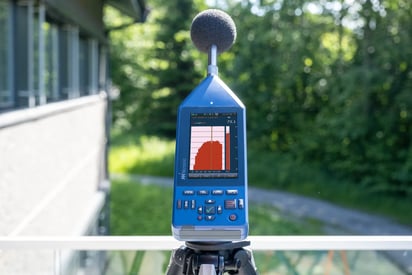
Reliable noise monitoring with sound level meter, stand-alone terminals or large-scale systems.
.webp?width=1824&height=2736&name=Image-107-(1824x2736px).webp)
Building acoustic is about the sound that travels between rooms - something you'd rather avoid.


.webp?width=450&height=275&name=NoiseTag-in-NorCloud-round-corners(1200x850px).webp)